You can unlink an Attribute Object from its Attribute Category if you do not want the fields in the Attribute Object to be available on the category's related windows. This removes the attribute object from the Attribute Category list, but not from the Attribute Object list.
In Administration Console, navigate to the Categories node.
Double-click Categories to open the window.
(Show picture)
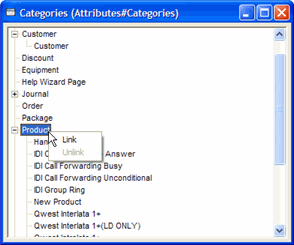
Click the appropriate category to expand its list of links.
Right-click the Attribute Object to be removed from the list and select Unlink. This displays a confirmation message box.
Click Yes. The Attribute Object is removed from the Attribute Category list.
See also: