Documentation Index

Fetch the complete documentation index at: https://help.idibilling.com/llms.txt

Use this file to discover all available pages before exploring further.

IDI version 26.8 is now available.  Click here for details: IDI Updates.

Linking Attribute Objects

Prev Next

In the Administration Console:

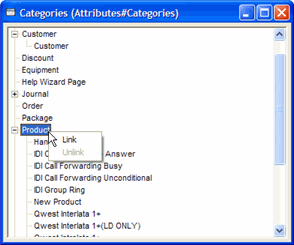
  1. Expand the Attributes tree. Double-click Categories. This displays the Categories window.

    (Show picture)

    AttributesCategories

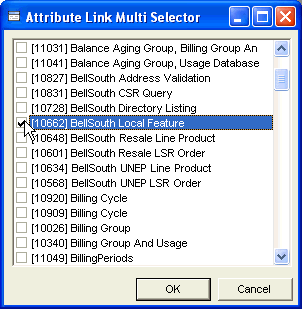
  2. Right-click the appropriate Attribute Category and select Link. This displays the list of Attribute Objects in the Attribute Link Multi Selector window.

    (Show picture)

  3. Select the Attribute Object(s)s to be included under the Attribute Category.

  4. Click OK. This closes the Attribute Link Multi Selector window and adds the Attribute Objects to the related Attribute Category.
See also:

About Attribute Categories

Unlinking Attribute Objects

About Attribute Objects

About Attributes