This table defines reasons why a trouble ticket was placed on hold (parked). The Trouble Hold Reasons table populates the drop-down list for the Hold Reason input field in the Select Hold Reason window which is displayed after a user attempts to park a trouble ticket.
To set up and maintain the Trouble Hold Reasons table:
Under Data Management expand the Journals folder and double-click Trouble Hold Reasons. This displays the Trouble Hold Reasons window.
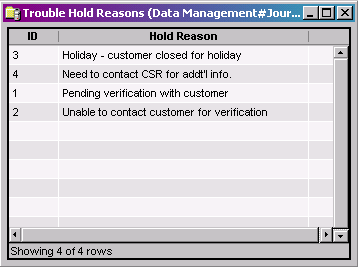
The Trouble Hold Reasons window provides the following information:
ID
System-generated identifier that uniquely identifies the Hold Reason.
Hold Reason
Explains why a trouble ticket is placed on hold/parked
The shortcut menu for this table lets you add, edit and delete trouble hold reasons. See Working with Data Management Tables.