This table defines special USOCs used by the PreOrder Conversion function. If a USOC cannot be mapped or is not supported, an error is added to the order which may indicate that a manual process is required. This lets you resolve the error before the order is sent to the provisioning company. To set up and maintain this table:
Under Data Management expand the USOCs folder and double-click Special USOCs. This displays the Special USOCs window.
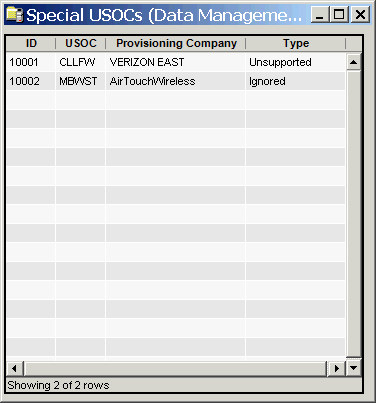
The Special USOCs window contains the following information.
ID
(read only)System-generated identifier that uniquely identifies the special USOC.
USOC
Universal Services Ordering Code
Provisioning Company
Name of the provisioning company.
Type
Special USOC type:
Ignored: If you know some of your USOCs do not need to be provisioned, you can mark them as “Ignored.” Ignored USOCs are recorded, but do not stop the order process.
Unsupported: If you know some of your USOCs need special attention before they can be provisioned. you can them as “unsupported". This creates a Manual Intervention error for any order with that USOC and it must be resolved manually before the order can be submitted.
The shortcut menu for this table lets you add, edit and delete special USOCs. See Working With Data Management Tables.