Zones are used to group service numbers by NPANXX. This lets you use the Limit-To functionality for products and pricing plans, provide Zone reports, and manage the implications of NPANXX splits more easily.
To set up and maintain the Zones table:
Under Data Management double-click Zones. This displays the Zones window.
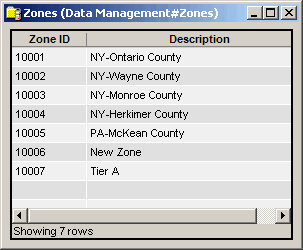
The Zones window contains the following information.
Zone ID
(read only)System-generated identifier that uniquely identifies the zone.
Description
An easily identifiable name for the zone.
The shortcut menu for this table lets you add, edit and delete zones. See Working With Data Management Tables.