This table defines possible resolutions for trouble tickets. To set up and maintain this table:
Under Data Management expand the Journals folder and double-click Trouble Ticket Resolutions. This displays the Trouble Ticket Resolutions window.
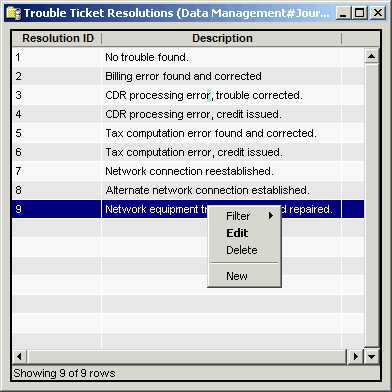
The Trouble Ticket Resolution window contains the following information.
Resolution ID
(read only)System-generated identifier that uniquely identifies the resolution type.
Description
Description of the resolution type.
Start Date
The first date the Trouble Ticket Resolution can be assigned. If left blank, this trouble ticket resolution type can be used until the end date.
End Date
The last date the trouble ticket resolution can be assigned. If left blank, this type can be assigned until an end date is entered and has passed.
Note
If the trouble ticket resolution is assigned between the start and end dates, it remains assigned (grandfathered) to that trouble ticket after the trouble ticket resolution type is no longer available for assignment.
The shortcut menu for this table lets you add, edit and delete trouble ticket resolution specifications. See Working with Data Management Tables.