AdvancePay Data Management Settings
- Published on Jul 26, 2026
In Data Management you can manage Order Types.
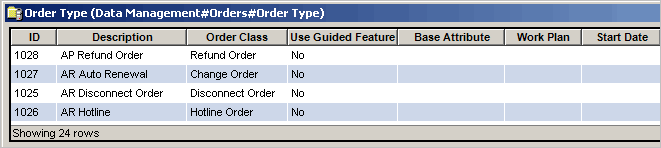
To access the Order Type table in Data Management:
-
Access Admin Console > Data Management > Order > Order Types
This displays the Order Type table where you can right-click to create, edit or delete an order type.
See also:
AdvancePay Security Settings
Was this article helpful?
Related articles
Knowledge Articles > Admin Console User Guide > Business Rules > AdvancePay Settings
Knowledge Articles > Admin Console User Guide > Business Rules > AdvancePay Settings > AdvancePay Business Rules Settings
Knowledge Articles > Admin Console User Guide > Data Management > Working with Data Management Tables > Orders