The Collection Status table populates the Collection Status drop-down list in the Update Collection Status and Bulk Update Collection Status window. It is also used in the Collections Search window as search criteria.
To set up and maintain the Collection Status table:
Under Data Management expand the Treatment folder and double-click Collection Status. This displays the Collection Status window.
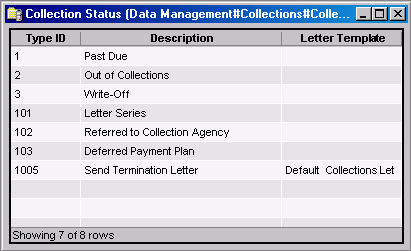
The Collection Status window provides the following information:
Type ID
(read only)System-generated identifier that uniquely identifies the collection status.
Note
Type IDs 1 - 1000, inclusive, are system defined. These statuses cannot be modified or deleted.
Description
Textual description of the collection status.
Letter Template
Identifies the type of letter to be sent to a customer with this collection status.
The shortcut menu for this table lets you add, edit and delete collection statuses. See Working with Data Management Tables.