Catalog Groups are logical groupings of the items in your Product Catalog. They are used to distinguish between features and rate plans. Catalog Groups can also be used to group catalog items for reporting purposes.
Note
If you want to use Catalog Groups for reporting purposes, custom development may be required to integrate this functionality into your reports.
The Catalog Groups table populates the drop-down list in the Add Catalog Group window. To set up and maintain the Catalog Groups table:
Under Data Management double-click Catalog Groups. This displays the Catalog Groups window.
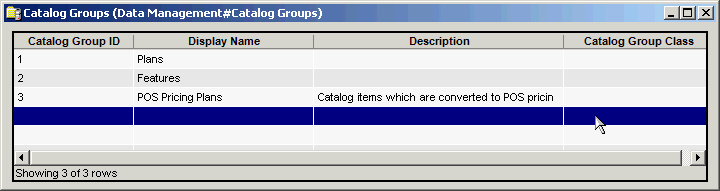
The Catalog Groups window provides the following information:
Catalog Group ID
System-generated identifier that uniquely identifies the Catalog Group.
Display Name
This is the Catalog Group name displayed in the drop-down list in the Add Catalog Group window In Product Management. A maximum of 50 characters is allowed.
Note
You must enter a unique name. The system will not allow you to enter the same Display Name for multiple Catalog Groups.
Description
Additional description of the types of catalog items in this Catalog Group. A maximum of 4000 characters is allowed.
Catalog Group Class
Select the applicable class (or None) from the drop-down list in the add or edit dialog.
The shortcut menu for this table lets you add, edit and delete catalog groups. See Working with Data Management Tables.