The web-based Product Catalog (separate from the IDI Desktop Client Product Catalog) provides product management functionality to support other web-based applications.
The Product Catalog is available via the Web Apps tray.
Show Picture

Selecting Product Catalog in the Web Apps tray lands you on a page with quick links to Product Catalog functions
Show Picture

The Product Catalog currently supports:
Viewing Associated SKUs for Workflow Provisioning - The Product Catalog serves as the repository for Provisionable Object Definitions (PODs). PODs are used in Provisioning to represent the items (SKUs) to be provisioned on a network. PODs are configured and managed using the Provisioning application. No user involvement is required in the Product Catalog.
Billing Taxes Calculator - Authorized users with Manage Billing Taxes Calculator permission can validate addresses and calculate taxes for different billing scenarios based on tax jurisdiction, account type, and selected catalog items without having to create/update an account or service.
Note
This functionality requires the IDI Tax API, which is available for an additional service fee. Contact your IDI account manager regarding the IDI Tax API. See Managing the Billing Taxes Calculator.
Broadband Labels - Authorized users with Manage Broadband labels permission can manage broadband labels in compliance with FCC order 22-86. See Managing Broadband Labels.
E-Rate - E-Rate is a federal program that provides funding to help schools, libraries, and consortia obtain affordable broadband. Authorized users with Manage E-Rate permission can configure E-Rate functionality. See Managing E-Rate.
Paperless Billing Incentive - Providers are moving away from paper billing to leverage the efficiency and cost benefit of electronic invoice delivery. Processing paper invoices is costly, uses valuable staff time and is prone to human error. Electronic delivery is faster, more efficient, and providers get paid sooner. This functionality enhances the system's capability to track whether an account should get a paper bill. This functionality lets authorized users with Manage Paperless Billing Incentive permission manage how to incentivize subscribers to opt for paperless billing. See Paperless Billing Incentive Setup.
Protection Plans - The IDI platform supports configuring and managing protection plans. This functionality is implemented in several areas including the web-based Product Catalog:
The Product Catalog lets authorized users with Manage Protection Plans permission set up protection plan profiles that establish rules for processing different plans. See Configuring Protection Plan Profiles.
Customer Care lets you add, view and manage protection plans on an account.
You can sell protection plans via the Orders web application and POS Make Sale.
Starting Blocks - Configurable starting blocks facilitate order entry by defining certain defaults and limitations that streamline the order entry process. Once configured starting blocks can be used to initiate orders in both the Orders and Customer Care web modules. Authorized users with Manage Starting Blocks permission can create, edit and otherwise manage starting blocks.
Note
Starting Block functionality, including the ability to configure them in the Product Catalog, must be enabled via the Enable Starting Blocks setting in the Orders web module.
Enable Starting Blocks setting
There are two new settings for enabling this functionality – one in Orders and one in Customer Care. The setting in Orders is required to enable this functionality. The setting in Customer Care is only needed if you want to use this functionality in Customer Care.
Enabling Starting Blocks in Orders
Show Picture
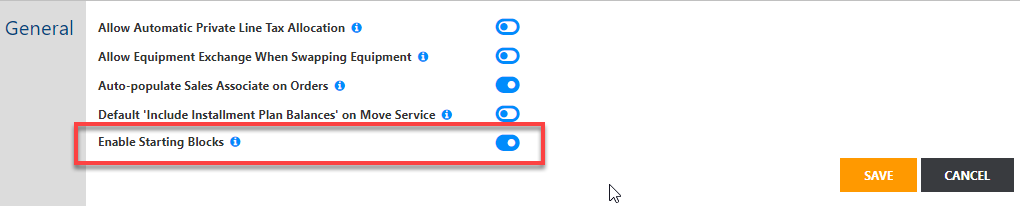
When disabled (default), there is no change to the current user experience in Orders and Customer Care. Also starting blocks cannot be configured in Product Catalog.
When enabled, the Product Catalog supports starting block configuration. Also the NEW (+) button in Orders is relabeled as START > and clicking it displays a dialog for selecting a starting block as a means to start a sale/order. Also, starting block functionality is supported in Customer Care if the corresponding setting is enabled there as well.
Enabling Starting Blocks in Customer Care
Show Picture
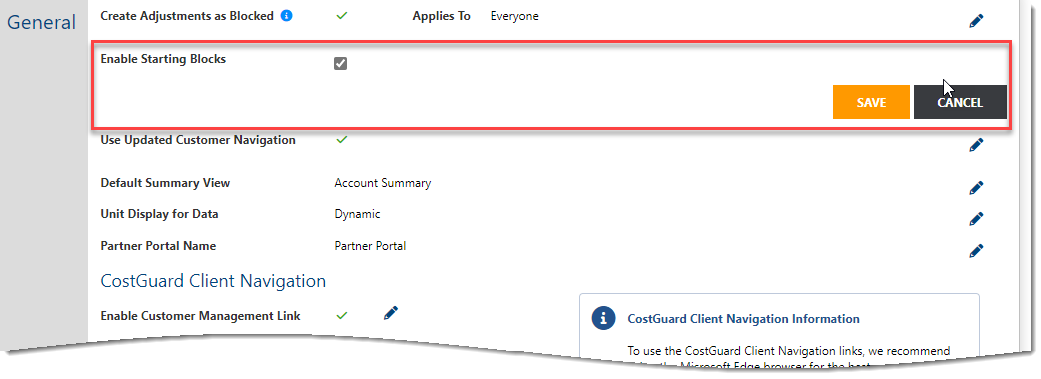
When disabled (default), starting block functionality and sale transactions are not supported in Customer Care. In this case you can enable the functionality in Product Catalog and Orders using the Orders setting and leave it disabled in Customer Care.
When enabled a Start Transaction button is provided on the Account Summary page (all views) to initiate account-level transactions. A button is also provided on Services and Features page when a service is selected to support service-level transactions. In both cases, clicking Start Transactions displays the dialog for selecting a starting block.
To configure starting blocks see Configuring Starting Blocks.

