LATAs are used in the Location field of a Rate Detail when the rating method is LATA or LATA.OCN.
To view and add LATAs:
From the Applications menu select BackOffice Management > NPA NXX Management > LATA Table. The LATA table is displayed.

From the shortcut menu, you can add, edit, and delete LATAs.
To add/edit a LATA:
Right-click in the LATA window and select New (or Edit). This displays the Add/Edit LATA window.
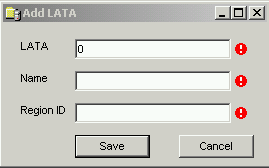
Enter the appropriate information and click Save to save the changes.
To delete a LATA, right-click in the LATA you wish to remove and select Delete.
Click Yes at the confirmation dialog to delete the entry.