
This development supports the Federal Communications Commission (FCC) mandate for Survivors of Domestic and Sexual Violence (FCC 23-96), specifically, item 64.6404, Protection of the Privacy of Calls and Text Messages to Covered Hotlines.
Calls and text messages to and from covered hotlines will be bypassed/omitted during core usage processing such that they will not be visible when viewing usage details from:
- Usage views in Customer Care, Customer Portal, OnlineBill, IDI Desktop client
- Invoice files (XML/PDF)
With release 24.10, a new unbillable code, CDR091, will default to action = Bypass Record. When set to Bypass Record, core derive logic will bypass calls and texts to and from covered hotline numbers, which are numbers set up as described above in the Orig-Term numbers table.

The parsed records are bypassed, so they are not associated with an account or service number in the system. Along with basic information about the bypassed call or text, the CDR file name and record number are included so that the original record can be referenced. These usage records will be available for auditing purposes. To protect the privacy of calls to protected hotlines, it is recommended to limit the access to administrator-level users.
Release History
- IDI platform 24.10 – Initial Release:
- Providers manually configure numbers to be covered in the Orig-Term Numbers table in Admin Console > Data Management.
- Usage records are available for auditing purposes via the Records Bypassed by Covered Hotlines report in the Report Explorer Usage folder.
- IDI Platform 25.5 – Enhancements:
- Bulk data import provides an alternative method for populating the Orig-Term Number table by importing the FCC covered hotline numbers file. Note: This method will be a viable alternative to the manual method when the FCC makes their covered hotline file available for providers to download.
- A system-defined trigger loads call records bypassed by unbillable rule code CDR091 and creates/uploads a document (csv) to IDI Document Storage as a confidential document with those records. The information retained through the trigger is the same information included in the Records Bypassed by Covered Hotlines report (csv) released in IDI 24.10.
Specifying Hotline Numbers
Covered hotline numbers must be entered into the Orig-Term Numbers table in Admin Console > Data Management. Two methods are supported:
- Manual entry. This is the only available method until the FCC makes their covered hotline file available for providers to download.
- The 25.5 release provides a covered hotline bulk data import specification that can be used when the covered hotline file is available from the FCC.
Manual Entry
In the Orig-Term Number table:
- Set ID to _CH
- Set Service Type to 800
- Enter the covered hotline number in the Term Number field.
Example for bypassing calls/texts to 800-888-1000:

Bulk Import
IDI platform 25.5 provides an alternative method for populating the Orig-Term Number table by importing the FCC covered hotline numbers file via the Bulk Import application. For each number, the FCC file contains a unique identifier, covered hotline number and date the number was added to the file. Along with this information, running the bulk import will also enter the _CH ID and enter the Service Type as 800.
The file specification is available in the IDI knowledge center here.
This bulk import supports both an initial load of the file and subsequent loads. Loading a file after the initial load will do a full replacement of the covered hotlines loaded through a file import. Notes:
- Covered hotlines configured manually are retained (not overwritten). Refer to the Covered Hotline Number Bulk Import specification in the IDI knowledge center. The Bulk Import Module article in the IDI knowledge center provides instructions for using the module to run this import.
- Submit a covered hotline file automation request if you need to automate the file feed. Note for IDI associates: This file automation request must be set up with a format parameter exactly as shown: /format:“IDI/CostGuardBulkData/CoveredHotline”
Auditing
The FCC requires that while usage for covered hotlines should not be visible to customers, it must be available in case it is requested. The IDI platform supports two auditing methods:
- Available with the 24.10 release, a Records Bypassed by Covered Hotlines report is available in the Report Explorer Usage folder.
- With IDI platform 25.5, a system-defined trigger will create/upload a document (csv) to IDI Document Storage as a confidential document with those records.
Bypassed by Covered Hotlines Report
The report will list any parsed CDRs that were bypasses with unbillable rule code CDR091.
- The report can be run by date range and contains:
- CDR Event Type (distinguishing call or text)
- Originating number
- Terminating Number
- Date and time
- Seconds (for call)
- CDR File Name
- CDR File Record number
Note: Bypassed records are stored in the Parse database, which is purged on a regular basis. The report should be scheduled to run so the results can be saved.
Report Permission
To protect the privacy of calls to protected hotlines, it is recommended to limit access to the new report (Records Bypassed by Covered Hotlines) by setting the Require Permission option on the report. This will restrict access to this report to specific profile(s) in the client application:

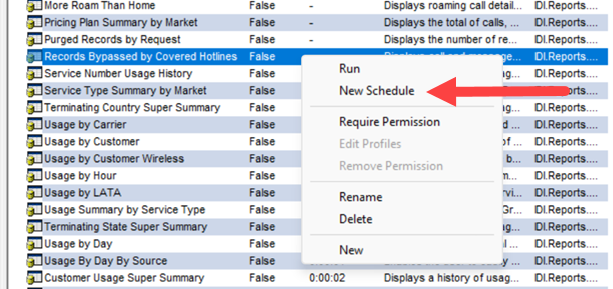
Scheduling the Report
It is recommended to schedule the report to run on a recurring basis to ensure having the report data on the file server (that will not get deleted).
Report Retention
Reports will be retained according to the Recurrence specified in the Report Schedule:
- If Recurrence is Daily, completed instances will be available for 31 days
- If Recurrence is Weekly, completed instances will be available for 3 months
- If Recurrence is Monthly, completed instances will be available for 1 year
To ensure permanent retention, use the system-defined trigger as described below.
System-defined Trigger
With IDI platform 25.5, a system-defined trigger is automatically created and enabled to load call records bypassed by unbillable rule code CDR091. It creates/uploads a document (csv) as confidential to IDI Document Storage. This retains the same information as provided in the Records Bypassed by Covered Hotlines report.
The trigger has a default scheduling pattern to run every 7 days with 10 days of bypassed records.
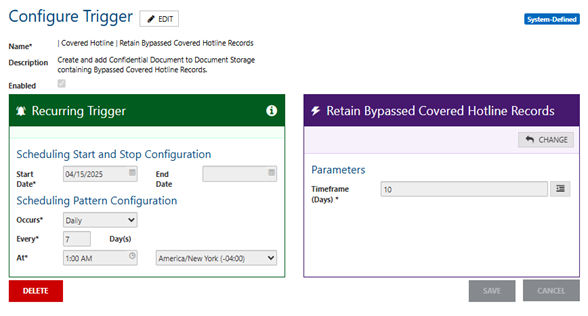
Once a file is created and uploaded to IDI Document Storage it will have the following:
- Document Name: bypassedcoverdhotlinesrecords_(date)(time).csv
- Document Category: Bypassed Covered Hotlines Records
- Confidential: marked YES
NOTE: If the Bypassed Covered Hotlines Records document category does not exist the action will create it.
Searching Files in Document Storage
You can search within IDI Document Storage for files generated by selecting the Bypassed Covered Hotlines Records category.
