
This article is intended for admin-level users responsible for auditing taxes.
Related Articles
Standard tax-related reports are available in the IDI Desktop Client Report Explorer and are located in the Taxes and Audit > Taxes folders.

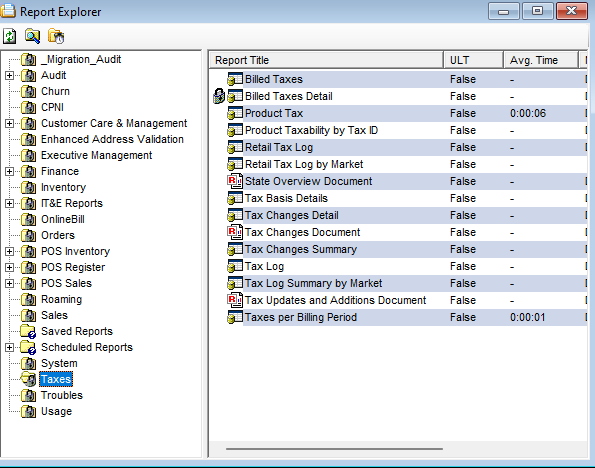
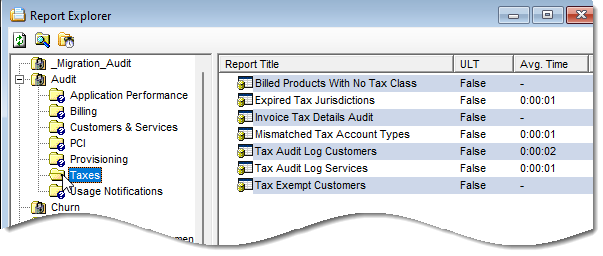
Taxes Folder
These reports are grid-based, unless indicated as PDF document.
Tax Log
This displays taxes due to the taxing entities, grouped by state. If an invoice group is specified, it will display all taxes due for this group.
It lets you see what has been charged (or not charged) jurisdiction by jurisdiction. You can use this monthly when billing is run to see what taxes were applied. It can be filtered by bill periods and months. You can compare the current month to previous months; and then review actual tax amounts to see if tax rates changed.
If you’re making changes to taxes, you can use this to ensure changes had taken effect – such as making sure taxes you didn’t want to apply are NOT applying.
You can send results to a financial 3rd party for evaluation or internal finance team to look at what was collected and what is due to the state or feds, etc. This is also used at year end to pay taxes and may serve as proof for auditors.
You can drill down into this report for more details – tax ID/jurisdiction details include customers and invoices that had the tax applied – you can look at it per bill cycle and see the customers in that bill cycle that had taxes applied
Tax Updates and Additions
This PDF report displays a listing of all additions or changes to the tax database (by the IDI tax team) in the specified interval, grouped by state.
Billed Taxes
This displays a summary of the taxes assessed. You can drill in to see the specific invoices that contain the selected tax.
Billed Taxes Detail
This displays specific invoices from the bill period to which the selected tax was applied. Drill down to the customer to whom the invoice belongs.
Product Tax
This displays taxes assessed by customer on chargeable products for the selected bill period. You can see taxes for certain products by bill period, tax ID, tax jurisdiction, account number, invoice number.
Product Taxability by Tax ID
This displays all taxable products and the applicability of the selected Tax ID. Drill down on any product to see its detailed Product Catalog entry.
Retail Tax Log
This displays taxes due to the taxing entities, grouped by state. The tax would be included for any sales finalized within the date range or between bill cycle start date and bill cycle end date (Grid based report) – in order to generate this, the user generating the report must be a POS user at the Global Location level.
Retail Tax Log by Market
This is only available to POS users at the Global Location level.
State Overview Document
This PDF report displays all state and local taxes with key details. State taxes are listed first, followed by County, City and Regional taxes.
Tax Basis Details
This displays a breakdown of all applicable taxes to the selected invoice. Drill down to the customer to whom the invoice belongs. This shows every tax that could have applied for the selected customer (based on a single invoice #/customer level) and whether there were any charges. This can be used to evaluate exemptions, usage, other details that could have impacted how a tax applies/applied, etc.
Tax Changes Detail
This displays a tax change reason detail together with state-level release notes. Use this if you are troubleshooting a big disparity between taxes for certain accounts from month to month, which could indicate a change.
Tax Changes Document
This PDF report displays a summary heading for the tax release, and within that a sub-heading for each state including the state-level release notes followed by the individual tax detail data for that state.
Tax Changes Summary
This displays the state-level release notes for all tax releases in the specified date range. Use this if you are troubleshooting a big disparity between taxes for certain accounts from month to month, which could indicate a change.
Tax Log Summary by Market
This displays taxes due to the taxing entities, grouped by market. If an invoice group is specified, it will display all taxes due for this group.
Taxes Per Billing Period
This displays the number of invoices and the total tax amount for any tax affecting the specified billing period. Drill down on any of the displayed taxes to access the invoice details, and from there, the associated customer.
Audit Folder
These reports are all grid-based.
Invoice Tax Details Audit
This facilitates auditing calculated taxes after billing processes have completed. The results help experienced personnel confirm invoiced items were taxed correctly (or not). The report provides insight into taxation details down to the service level. An example application is to audit the taxation from the roll-out (and billing) of new service-level products and packages.
Billed Products with No Tax Class
This audits the Product Catalog and shows which products don’t have Tax Classes assigned for the selected bill period. You should use this report on a regular basis to verify that products will have taxes applied as expected.
Expired Tax Jurisdictions
This provides a list of expired tax jurisdictions assigned to customers that would indicate either that the BCT process isn’t running, failed, etc. These need to be corrected because valid expired tax jurisdictions mean taxes are not collected on those accounts.
Mismatched Tax Account Types
This indicates differences between how taxes are set at account level and service level – for example, if customer is set for residential Tax Account Type but service is set for business Tax Account Type. Note: Tax Account Types on Account Types are set in the Data Management in Admin Console and are visible in the client under the Tools > Reference menu in the client, then under Account Type Table.
Tax Audit Log Customers
This shows errors found in the daily BCT Audit Tax Assignment automated process. The BCT process verifies every customer contact (primary billing contact) has the correct tax jurisdiction assigned (based on address validation) and if it’s not correct, it updates it. If the process can’t update it, errors are written to this report. This report should be run on a regular basis (daily or prior to billing). Note: The details in the report will include tax exempt accounts or disconnected accounts which can be ignored.
Tax Audit Log Services
This report is equivalent to the Tax Audit Log Customers report, except that it audits services and service contacts.
Tax Exempt Customers
This shows every customer with their general (not extended) exemptions.
