All revenue-generating items in the IDI platform including Product Catalog items and usage types are assigned an Invoice Category. The Invoice Category determines whether pricing for the assigned items is regulated. Invoice Category is also used with Accounts Receivable Groups (also configured in Data Management) as a means of determining how payments and adjustments are allocated. Items within the same Invoice Category are paid at the same time.
Invoice Category is considered in combination with Invoice Number when determining how payments/adjustments are allocated. There are two possible allocation methods:
Allocate first by Invoice Category, then by Invoice Number
Allocate first by Invoice Number, then by Invoice Category
Each customer is set to use one of these allocation methods through an Accounts Receivable Group which is assigned when the customer account is created. The Accounts Receivable Group specifies the allocation method and also establishes the order by which Invoice Categories are paid.
The values in this table populate the Invoice Category drop-down lists in
Product Catalog
Products
Packages
Pricing Plans
Services
Discounts
Data Management
Accounts Receivable Group Details
Finance Group Details
Usage Types
Customer Management
Add Adjustment
To set up and maintain the Invoice Categories table:
Under Data Management double-click Invoice Categories. This displays the Invoice Categories.
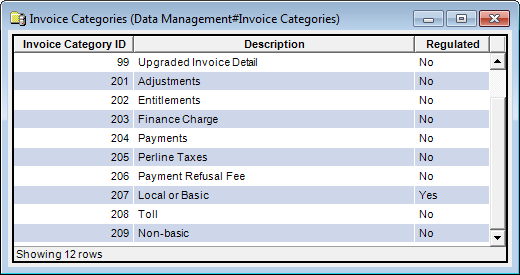
The Invoice Categories window displays the following information:
Invoice Category ID
System-generated identifier that uniquely identifies the invoice category.
Description
Description of the invoice category.
Regulated
If Yes, this category is for reference and reporting only. This does not affect how payments are applied for any system functions.
Note
The system defined categories cannot be edited or deleted.
The shortcut menu for this table lets you add, edit and delete invoice categories. See Working with Data Management Tables.