When wireless call detail records are loaded into the system, the information defined in the Cellsites table is used to determine the location of the caller. The information in this table is also used for generating outcollect records and for reporting purposes.
To set up and maintain the Cellsites table:
Under Data Management, double-click Cellsites. This displays the Cellsites window.
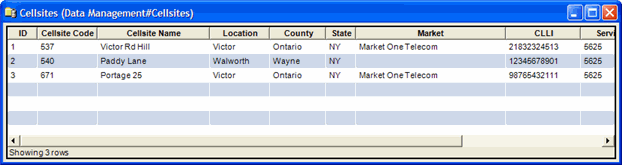
The Cellsite window displays the following information:
ID
System-generated identifier that uniquely identifies the Cellsite.
Cellsite Code
A unique 1 - 10 digit code for the Cellsite. This code is used in outcollect processing.
Cellsite Name
Text that describes the Cellsite.
Maximum characters: 50. If you enter more than 50 characters, only the first fifty characters are stored in the table.
Location
Text that describes the location of the Cellsite. This is used in outcollect processing (serving place).
Maximum characters: 10. If you enter more than ten characters, only the first ten characters are stored in the table.
County
The name of the county where the Cellsite is located (not required).
Maximum characters: 40.
State
A 2-character state designation where the Cellsite resides. This is used in outcollect processing (serving state).
Market
The name of the Market associated with the Cellsite. Select the appropriate Market from the list. (not required) If no market is associated with the cellsite, the dropdown displays 'None."
CLLI
The Common Language® Location Identifier associated with the cellsite.
Maximum characters: 11.
Serving SID
The System Identification Number of the cellular carrier responsible for the cellsite.
Maximum digits: 4.
Toll NPA
The NPA associated with the cellsite. Used to determine the Toll Rating Point for Incollects and Outcollects.
Toll NXX
The NXX associated with the cellsite. Used to determine the Toll Rating Point for Incollects and Outcollects.
Notes:
Some customers may have validation added to this form so that Market is required when a new cell site is added. Both the County and Market fields can be exported via the Export: Select Columns window.
When you edit a cellsite, changing any fields (other than Cellsite Name, Location, Market, or County) may affect rating. The shortcut menu for this table lets you add, edit and delete cellsites. See Working with Data Management Tables