This table defines account statuses which describe the disposition of customer accounts. The first four account statuses, Active, Disconnected, Suspended, and No Longer in Service, are used by the system and cannot be modified. To set up and maintain the Account Statuses table:
Under Data Management double-click Account Statuses. This displays the Account Statuses window.
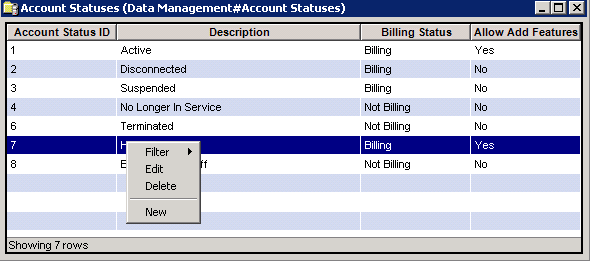
The Accounts Statuses window contains the following information.
Account Status ID (read only)
System-generated identifier that uniquely identifies the account status record.
Note
Status IDs 1-4 are system-defined and cannot be modified or deleted.
Description
A description of the status type (Active, Disconnected, Suspended, etc.).
Billing Status
Determines if an account is skipped at billing time. Choices are Billing or Not billing.
Allow Add Features
Determines whether accounts with this status are allowed to add Services and Features.
When submitting an order that contains new services and/or features, the system will check the customer's current Account Status to determine whether it is configured to allow new Services/Features:
If the Account Status status allows adding features and services, the order is submitted and processed.
If the Account Status does not allow adding features and services, the system will respond with the error message Catalog Items cannot be added to customers with an Account Status of <account status description>.
The shortcut menu for this table lets you add, edit and delete account statuses. See Working with Data Management Tables.