Tempus is adopting the new Visa and MasterCard requirements for credentials on file for credit card transactions. Recognizing stored credential transactions allows for greater visibility into the transaction risk, enabling robust processing and differential treatment. Authorization rules have been defined to help identify initial storage and usage of stored payment credentials to enable differentiated processing. Fines may apply and decline responses may increase if the established rules are not followed.
To support this in the IDI platform, there are new settings in the Tempus payment gateway setup. An Admin Console setting enables the functionality for Customer Management, and an equivalent setting enables the functionality in POS. Both settings default to Yes (enabled).
When enabled, the IDI platform will obtain and store an OriginalNetworkTransactionID for the following scenarios (if one isn’t already present in the Database):
- Creating a new E-Pay account in Customer Management or through POS
- Updating Card information in Customer Management, POS or OnlineBill
- Processing a charge to an existing E-Pay account in Customer Management, POS or OnlineBill
- Processing recurring monthly payments
- Processing E-Pay payments in Customer Care (Note: Support for Tempus in Customer Care is new with this release.)
New Functionality
This enhancement enables the IDI platform to process payments to Tempus with COF class and transactionID. The Tempus gateway version has been updated to support the latest API specs. The transactionID field is populated in the database. It does not change on subsequent charges. The field is encrypted and is not replicated. The transactionID is passed into Tempus on subsequent transactions so that it can be identified as previously used and stored credentials.
- On creating a new E-Pay account in Customer Management or POS, IDI obtains and stores the transactionID. Note: Updating an existing E-Pay account to a new credit card number requires a new transactionID for the new credit card number.
- On processing a charge to an existing E-Pay account in Customer Management or POS, the system passes in the already obtained transactionID for the card if there is one in the database. For first time transactions on an existing E-Pay account once the setting is enabled, there won’t be a transactionID in the database, so one will be obtained.
- On processing recurring monthly payments or payments in OnlineBill, the system obtains a transactionID if one isn’t in the database and then passes it in.
- For E-Pay recurring monthly transactions, the recurring COF Class is passed in. For E-Pay one-off transactions, the customer initiated COF Class is passed in.
- For POS transactions, when saving the card as an E-Pay account the customer initiated COF Class is passed in. When not saving the card as an E-Pay account, the COF Class is not passed in.
- Similarly, for OnlineBill transactions when saving account information or using an existing E-Pay account, the customer initiated COF Class is passed in. The COF class is not passed in for OnlineBill transactions that don’t save account information.
Support for Tempus in Customer Care
Customer Care has been updated to support Tempus as the payment gateway.
- Support for credit card payments – You can use existing credit card E-Pay accounts in Customer Care when processing payments through Tempus. Note: The ability to create a credit card E-Pay account is still not supported in Customer Care when using Tempus.
- Support for ACH payments – You can use an existing ACH account and create new ACH E-Pay accounts in Customer Care.
When Tempus is the configured payment gateway for your system, clicking NEW on the E-Pay accounts screen in Customer Care takes you directly to the Create Bank Account screen. (When Authorize.Net is the configured payment gateway there is an intermediate step to select either credit card or ACH.)

Payments processed through Customer Care to Tempus will obtain a transactionID if one doesn’t already exist and pass it to Tempus when it does.
Setup
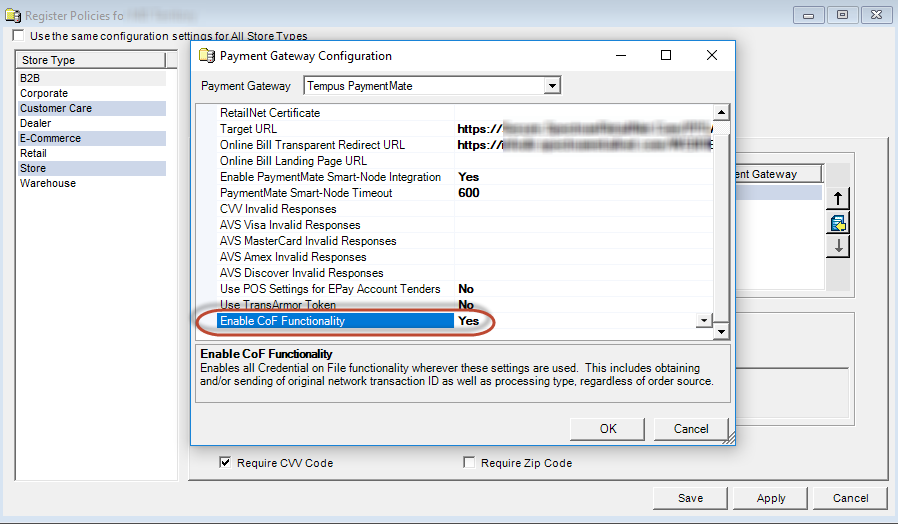
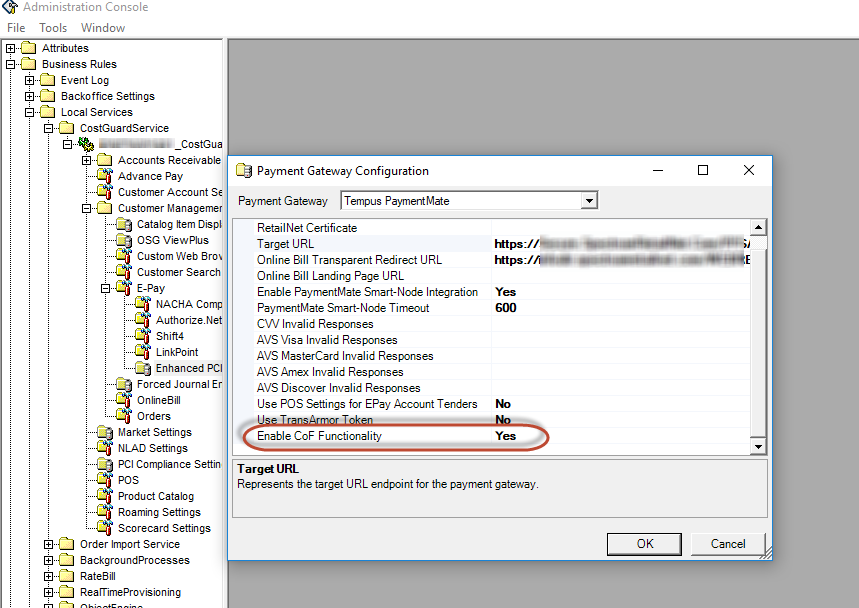
There are two new settings for Tempus Payment Gateway setup (in Admin Console and POS Register settings) to enable/disable support for stored credentials. Both settings are labeled Enable CoF Functionality and default to enabled (Yes).
Admin Console Setting for Customer Management
The new setting in the Admin Console is under Business Rules > Local Services > CostGuard Services > Customer Management > E-Pay > Enhanced PCI Configuration.
This setting is used by Customer Management E-Pay screens and transactions. This setting defaults to Yes. Set to No if you want to defer this functionality until a later time.
Note: This setting is not accessible by customers and will require a service request to change.
Register Policy Settings for POS
The Enable CoF Functionality setting is also located in the Register Policy for each POS location. In POS Back Office, select a Location, then right click and choose Register Policy. In the Register Policy dialog, click the Tender tab, then right click on an Accepted Tender Type and choose Payment Gateway > Configure. Select Tempus PaymentMate from the Payment Gateway drop down menu.
This setting is used for processing credit card transactions, and for creating/using E-Pay accounts in POS. The setting defaults to Yes. Customers may enable/disable the setting as needed in all respective retail locations.