
A business process may require taxing at the component level of a one-price package. This was previously accomplished by changing the charge on line items within the one-price package. The IDI platform supports taxing at the component level in the updated systems by removing product instances under one-price packages and overriding the Tax by Component allocations on product instances within Customer Care.
Note: This feature applies to packages set up in the Product Catalog as one-price packages with Tax at the Component level enabled. It supports first level product packages. Nested packages are not supported by the Tax by Component Allocation functionality
Customer Care Updates
You can edit a one-price package, end date products, and override the Tax by Component Allocation, across all products, in the package.
If you do not override the Tax by Component Allocation at the product level, there will be a default value. The default value will be the charge value set in Product Catalog.
On selecting and editing a one-price package, you’ll see a new option in the Details tab – Tax Allocation Override.

Selecting the Tax Allocation Override option will open a new panel and all products, under the first level of the package, will appear in the panel.
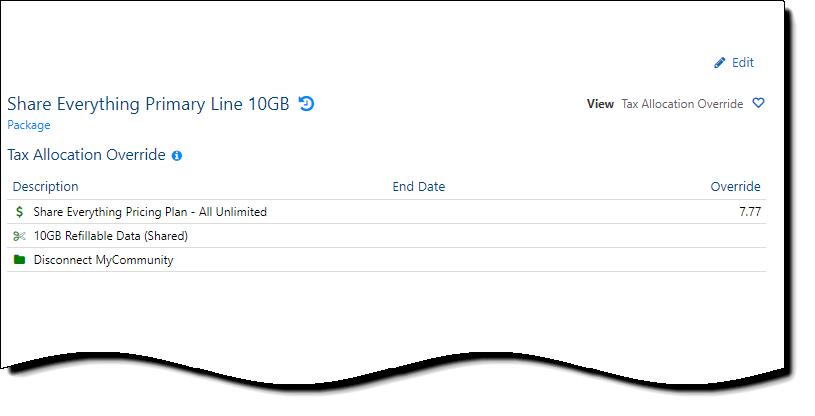
When you edit the one-price package, you can update the following values:
- End Date – Lets you remove products from the one-price package. Once an end date is set and the product reaches its end date, it will no longer be counted in the Tax by Component Allocation functionality.
- Override – Amount to override across the products under the one-price package
You may add numbers equal to or greater than zero. Negative numbers are not allowed when overriding the Tax by Component Allocation.
The default value in the Override field, is the charge value set in Product Catalog.
You can undo changes/values set in the Override field.

Billing Engine Updates
The billing engine has been updated to support using the new Tax Allocation Override values. Customers will be billed only for the charge of the one-price package, not the combination of the package and component charges. The billing engine will now use the Tax Allocation Override value first and then fall back to the existing Charge value in the Product Catalog if Tax Allocation Override for an item is NULL. In other words:
Entering 0 (zero) for the item’s Override value = 0% of the chargeable products goes towards the taxable amount.
Entering NULL for the item’s Override value = fall back to Product Catalog charge to determine % of chargeable products goes towards the taxable amount.
Note: A new column was added to the NonUsgSvc table to store the new Tax by Component Allocation value.
The billing engine has also been updated to handle scenarios where it is necessary to exclude the child of the one-price packages. Any products within the one-price package that meets one or more of the following scenarios will not be included in the % of chargeable products going towards the taxable amount:
- start = end date
- billing status = 0 (inactive)
- product is not applicable for bill period
- starts after bill period end date
- ended before bill period, we go off of the bill period start date.
