
This describes options related to flat fee taxes are available when adding/editing a tax in IDI Desktop Client Tax Management. Note: These options apply when the Per-line Tax option is not selected. If Per-line Tax is selected these options are ignored.
The Flat Fee options are available on the Rates and Tiers tab on the Add/Edit Tax form (Tax Management > View > Taxes).
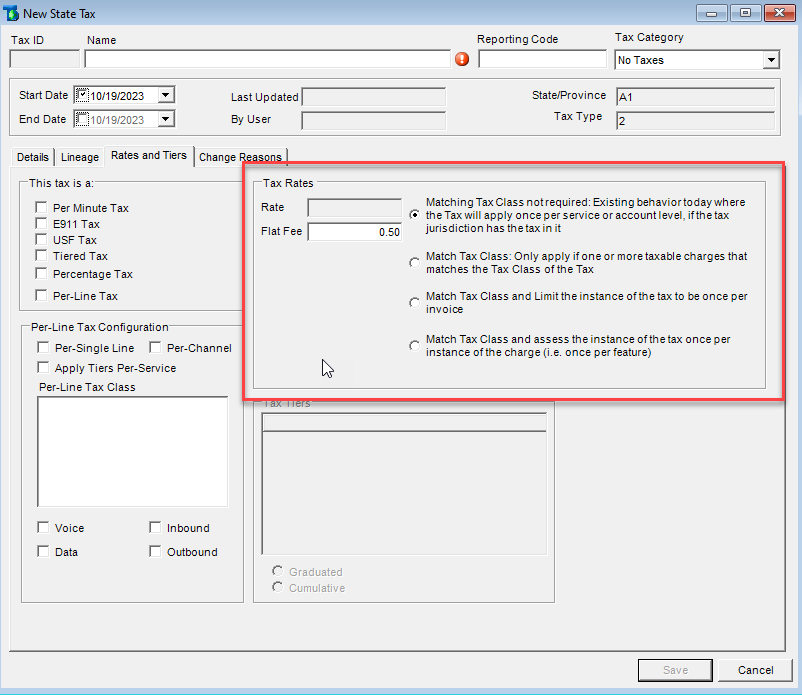
- Matching tax class not required (Option 1) – A flat charge will be assessed once per account. The IDI tax engine will not look for a matching tax class. The tax itself would not need to be configured to any particular tax class since there is no matching involved at the SKU level. It simply assesses one charge to all active accounts. By default, this includes both parent and child accounts, regardless of invoice responsibility.
- Match Tax Class (Option 2) – The IDI tax engine looks for SKUs with an assigned tax class that matches the tax configuration. As long as there is at least one SKU with a matching tax class on an active account, a single instance of tax will be assessed to that account. If an active account has no SKUs that match the tax configuration, no tax will be assessed to that account.
- Match Tax Class and limit to once per invoice (Option 3) – This is essentially the same functionality as option 2 above, with an extra check to ensure the apply once per invoice rule is enforced. Note: This option supports the Colorado Retail Delivery Fee (CORDF) as described in this knowledge article: Support for Colorado State Retail Delivery Fee.
- Match Tax Class and assess the instance of tax once per instance of the charge (Option 4) – The IDI tax engine looks for SKUs with matching tax class and assesses the tax or fee based on the number of matches found. For example, if an active account has ten SKUs that match the configuration of the tax, ten instances of the flat tax will be assessed to the account.
