
This optional report provides a summary of new charges for account-level, and both wireline and wireless services. This is to make invoices easier to read, and save readers from having to manually add the charges to verify if the total monthly charge is correct.
Setup
To use this functionality, setup is required in both Admin Console and Configuration Console.
- In Admin Console the Account and Service New Charge Summary XML report must be enabled.
- In Config Console the specific Product Catalog group ID(s) need to be entered in a comma separated list on the Account/Service New Charge Summary Catalog Groups property on the XML Invoice General Configuration page.
Both of these settings are not available to CostGuard users and must be configured by an authorized IDI associate.
Enabling the Report in Admin Console
The Account and Service New Charge Summary XML report must be enabled in Admin Console. The path for this setting is:
Business Rules > Local Services > RateBill > server_RateBill > Invoice Formats…>Optional Reports
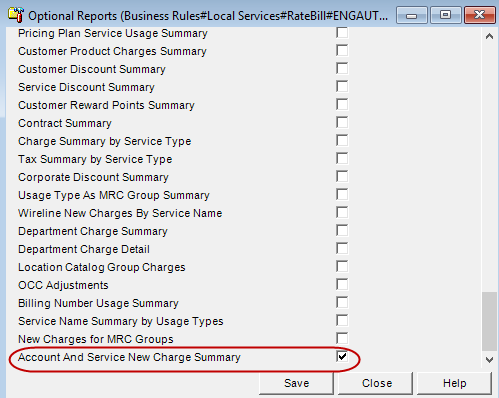
Configure Product Catalog Groups in Config Console
Prior to using the new report, the product catalog group(s) to be summarized for bundled charges must be specified in a new Config Console property. The specific product catalog group ID(s) need to be entered in a comma-separated list on the XML Invoice General Configuration page in Config Console. The path to this setting is:
Local Services > Rate Bill > … > XML Invoice General Configuration
The new property is labeled: Account/Service New Charge Summary Catalog Groups

Account and Service New Charge Summary XML
This report contains summarized charges for the account and for the services on the account as listed below. Account level charges are broken out by the Product Catalog group(s) configured for the report (in Config Console). Account-level charges for products in the configured groups are listed with the group name. All other account level charges that are not for products in the configured group(s) are listed with the account number.
Summarized Totals:
- Number
- For account-level charges, contains product catalog description or account number
- For service-level charges: Service Number
- Plan_Charge
- Includes charges for products in the Plans Product Catalog Group
- Excludes charges for products where Extended Tax property is true
- Additional_Charge
- Recurring and Non-recurring charges not captured in Plan_Charge (products with a Plans Product Catalog Group)
- Excludes charges for products where Extended Tax property is true
- If the Separate Charge Adjustments setting is enabled for the environment, this includes debit Adjustment amounts where the Is a Charge property on the corresponding Adjustment Type is true
- Airtime_Usage (usage charges where the service type of the usage type = Airtime)
- Other_Usage (usage charges where the service type of the usage type not Airtime, Data, Roaming, or Message). Non-wireless usage charges are included here.
- Roamer_Usage (usage charges where the service type of the usage type = Roaming)
- Data_Usage (usage charges where the service type of the usage type = Data)
- Message_Usage (usage charges where the service type of the usage type = Message)
- Discounts
- Taxes
This also includes charges for products where Extended Tax property is true
- Total
- Air_Roam_Usage (sum of airtime and roamer usage charges)
