
Starting with CostGuard 17.2 Service Providers will have an option to change the way balances are processed for Non-invoice Responsible accounts. The new option will result in NIR balances being added to the Invoice Responsible parent’s balance as part of the bill run.
The Corporate Roll-up functionality addresses several areas of customer feedback in regards to the difficulty working with corporate structures. The most common feedback received from customers was that:
- The invoice totals for a IR parent reflected any NIR children however the parent’s balance buckets do not. Balances for the corporate structure are stored at the individual account level which makes it more difficult to understand the balance status for the structure.
- Payments received at the IR Parent must be allocated to the NIR children to offset the balances that are stored there. This allocation process results in one initial payment record spawning numerous child allocation records which is confusing and makes it difficult to track what payments the subscriber made and which the system created.
- Short-paying corporate structures results in NIR child accounts going past due since there were not enough payments received to offset all the child balances. The payment allocation logic is fixed and it was hard to determine how an account ended up being the one that is past due.
- Credit to accounts do not allocate up or down the structure. There are scenarios where an account may have a credit balance in the structure while another is past due.
Corporate Roll-up Functionality
Starting with 17.2 CostGuard will have an option to roll-up NIR child balances to the IR Parent as part of the bill run. This setting effects processing for all corporate accounts in the environment that it has been enabled. Once enabled the result will be.
- NIR child charges will be aggregated up to the IR Parent’s total new charges as part of billing. This will result in these charges being added to the Parent’s current balance bucket.
- Adjustments on NIR child accounts will be aggregated up to the IR Parent’s invoice as part of billing. This will result in these transactions being accounted for in the Parent’s balance forward calculations. Please Note: Roll-up of adjustments will not occur on the first invoice for an account after the setting has been enabled, it only will occur if the previously generated invoice was also rolled up. This is done to allow any clean-up or pre-moving of balances to occur prior to enabling the setting.
- A new Account Balance Transaction Type of ‘Corporate Rollup Offset’ will be applied to offset the child’s invoice total new charges and adjustments. This record will be visible in the balance ledger for the child.
- The result will be that NIR children that had a 0.00 balance prior to billing will still have a current balance of zero after billing completes.
Enabling Corporate Roll-up Functionality
Corporate roll-up functionality can be enabled by IDI on a per environment basis. Service Providers should work with their Account Manager / Project Manager to determine when the functionality will be enabled for them. A few notes about enabling this functionality:
- It can be enabled at any time and does not require providers with multiple cycles to bill all of them within a given month one way or the other. The setting should not be enabled during an in-progress bill run however.
- Once the functionality is enabled for an environment it cannot be turned off.
- Once enabled all billing of corporate accounts going forward will utilize the new option.
Customer Care Invoice Display Changes
Changes have been made to Customer Care to make it easier for users to understand invoices for Corporate Accounts.
Non-Invoice Responsible Invoice
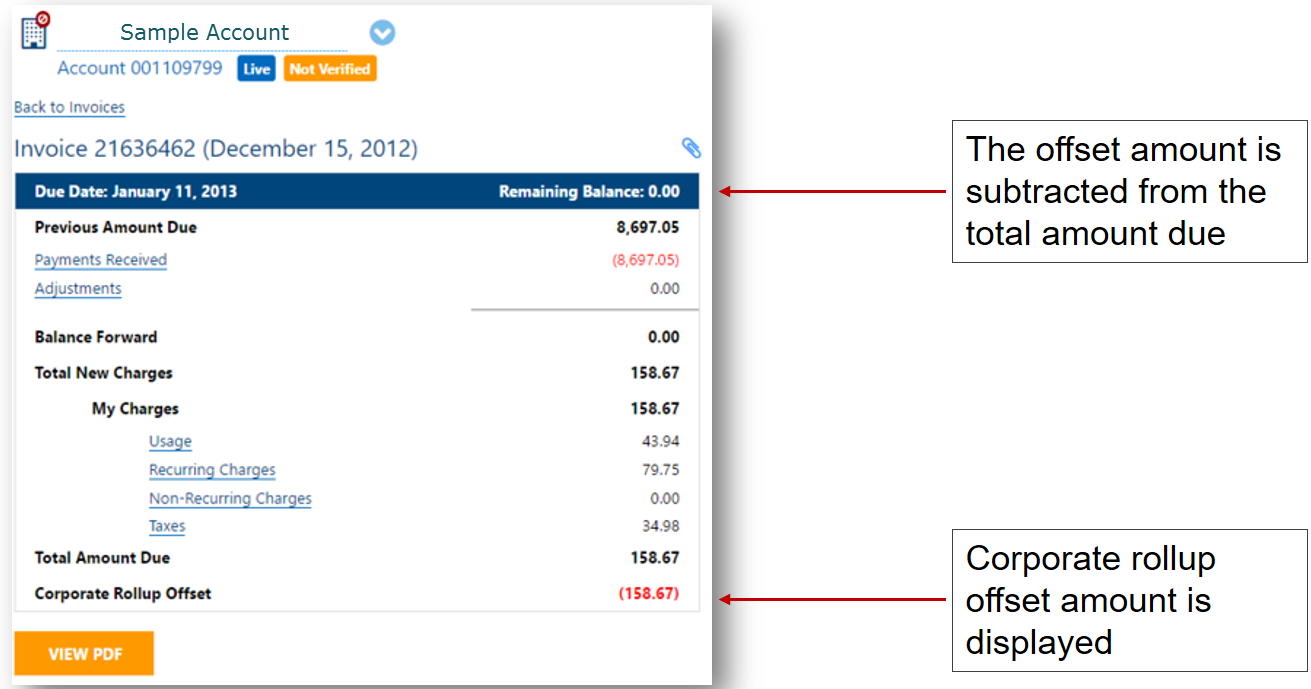
- Corporate Roll-up offset is displayed after the child’s total amount due
- Remaining Balance is displayed at the top instead of Total Amount Due. This is done to reflect the balance the child is responsible for.
Invoice Responsible Parent
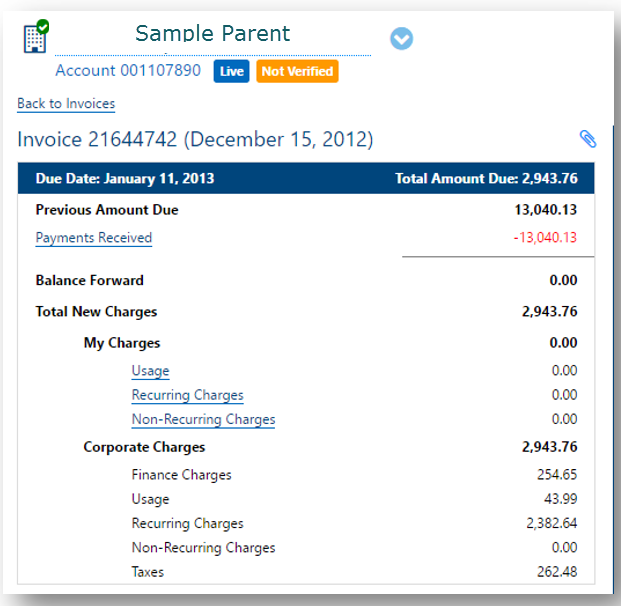
- Total New Charges section has been reorganized to help users better understand which charges were generated at the account they are viewing (My Charges) and which came from NIR Child Accounts (Corporate Charges).
- Adjustments for NIR children are now displayed above the Balance Forward line on the parent.
Dealing with pre-existing Child balances
The Corporate Roll-up functionality only processes invoice amounts for new invoices created after it is enabled. Pre-existing Child balances will continue to be handled using existing system processes until they are completely offset.
NIR Child Accounts with Pre-existing debit balances
- New invoice totals will roll-up to the parent however pre-existing debit balances do not.
- Child accounts with these pre-existing debit balances will continue to store these balances in their own balance buckets.
- Payments made at IR Parents will continue to allocate down to the children to offset these balances. This will continue to happen automatically as it did prior to the Corporate Roll-up functionality being enabled.
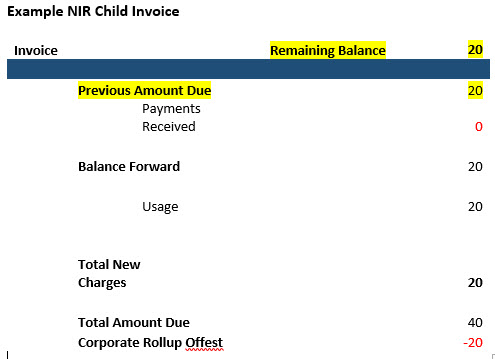
- Invoices for child accounts with pre-existing debit balances will show both the previous amount due amounts and the corporate roll-up amounts. The invoice field ‘Remaining Balance’ for these accounts will not be zero.
NIR Child Accounts with Pre-existing credit balances
- New invoice totals will roll-up to the parent however pre-existing credit balances do not.
- Child accounts with these pre-existing credit balances will continue to store these balances in their own balance buckets.
- New invoice amounts for NIR child accounts will roll-up to the parents which leaves the only way to offset existing credit balances is with manual adjustments.
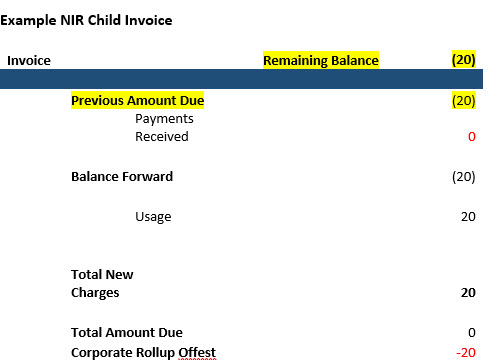
- Invoices for child accounts with pre-existing credit balances will show both the previous amount due amounts and the corporate roll-up amounts. The invoice field ‘Remaining Balance’ for these accounts will not be zero.
Options for dealing with pre-existing balances
Debit balances
#1 – Utilize existing payment allocation logic
As payments are received for a corporate structure they will continue to be allocated to the oldest balance buckets first. This will occur even if new invoice amounts are being rolled up to the parent. Over time, as payments are received and the older pre-rollup balances are offset the outstanding balances will be reduced to those being stored at the IR Parents.
During this period, as indicated above, NIR child accounts will be both carrying a balance themselves as well as rolling up new invoice amounts.
#2 – Work with IDI to manually roll-up existing balances to parent accounts
Providers have the option of working with IDI to script adding adjustments to the NIR Child and IR Parents accounts to reset the balances prior to enabling the Corporate Roll-up functionality.
This option eliminates instances where NIR Child accounts are carrying old balances at the same time they are rolling up new ones however it will result in loss of aging information and finance charges for the outstanding Child balances.
Credit balances
#1 – Use CostGuard to manually adjust balances to parents.
CostGuard Client or Customer Care can be used by the service provider to manually move the credit balance to the Parent account.
#2 – Work with IDI to manually move credit balances to parent accounts
Providers have the option of working with IDI to script adding adjustments to the NIR Child and IR Parents accounts to move the balances prior to enabling the Corporate Roll-up functionality.
