
A setting in the IDI platform controls how payments targeted for non-invoice responsible (NIR) accounts are handled. Prior to this change, payments have been allowed without restriction on NIR accounts. Disallowing such payments may help customers avoid potential billing issues.
Setup
A new drop down menu to configure NIR payment handling is available in the IDI Desktop Client under Applications > Accounts Receivable Management . Payment Import Settings.
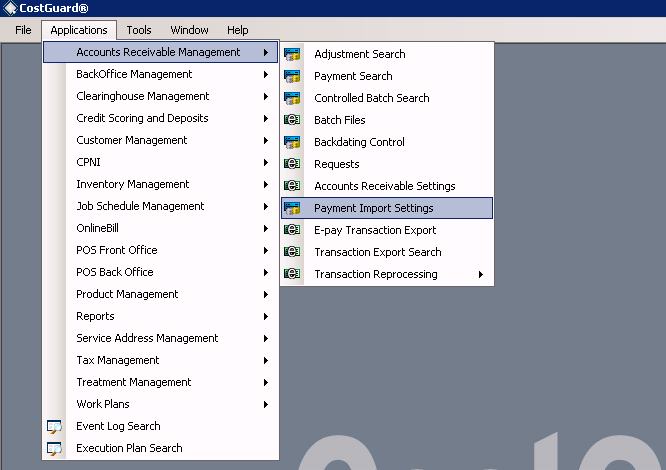
This displays the Payment Import Settings form. The new setting is labeled Non-Invoice Responsible Payment Guidance.

- Allow – Payments can be applied to NIR accounts. This is the default option to retain compatibility with previous versions.
- Disallow and Generate an Error – Import file will write the following error message to the import log: Non-Invoice Responsible payment guidance setting does not allow payments to non-invoice responsible accounts.
- Disallow but attempt to apply payment to IR parent – Payments will be applied to current IR parent. If an invoice responsible parent cannot be located an error will be generated.
Payment Processing
Payments targeting NIR accounts will now be handled according to the new setting. This setting applies to the Payment Import GUI in the Client and to the Background Process Payment Import.
Error Handling
If an error occurs during the background process payment import, the remaining records in the file will be loaded anyway.
If an error occurs during the GUI payment import, the entire file will fail and none of the records will be imported.
Effect of Inactive Setting when applying payments to IR parents
First, the NIR Payment guidance logic determines the account to be targeted by looking at the following fields in this order:
- Invoice Number
- then Customer Acct Number
- then Service Number
Once the account is determined, the new NIR payment guidance setting is applied. Finally, the Inactive Account setting (Accounts Receivable Settings/Allow Payments and Adjustments on Inactive Accounts) is applied:
- If the Inactive Account setting is disabled, the NIR payment guidance logic will traverse up the parent chain until it finds the nearest active Invoice-responsible account.
- If the Inactive Account setting is enabled, the payment will be applied to the nearest Invoice-responsible parent account, even if it is inactive.
- In either case, when no appropriate parent account is found an error message is generated.
