This solution lets you set up multiple usage type groupings in the report using the Settings configuration in Admin Console. Each group of configured usage types will be grouped separately with separate sub-totals in the XML output.
Setup
To set up multiple usage type groupings, configure the applicable groupings in Admin Console > Data Management > Settings.
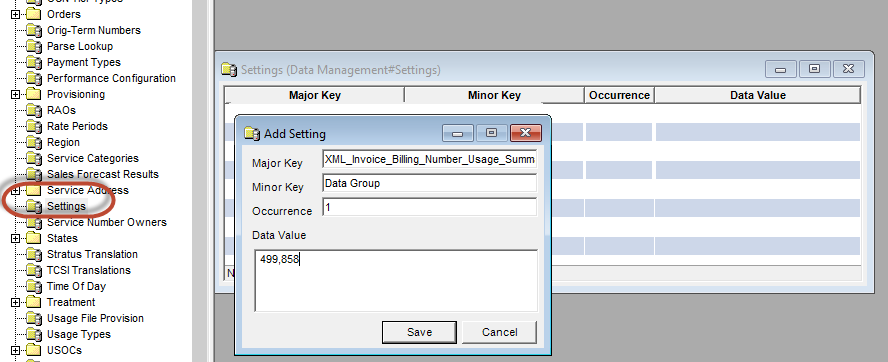
- Set the Major Key to: XML_Invoice_Billing_Number_Usage_Summary
- Use the Minor Key to distinguish groups. For example:
- Group 1:
- Major Key: XML_Invoice_Billing_Number_Usage_Summary
- Minor Key: Data Group
- Data = <Comma-separated list of occurrence-based Usage Types>
- Group 2:
- Major Key: XML_Invoice_Billing_Number_Usage_Summary
- Minor Key: Messaging
- Data = <Comma-separated list of occurrence-based Usage Types>
- Group 1:
Notes:
- A specific usage type should not be configured in more than one grouping. For usage types to be included in the Billing Number Usage Summary report, they must be set up as occurrence-based (data, messaging). This has always been a requirement for this report (not new functionality).
- Customers using this report prior to CG 21.6 that would like to take advantage of the new functionality must delete the previous settings for the report and enter the usage type groups as described above. Note: This will result in changes in XML output that will affect your billing print vendor.
- Configuration prior to CG 21.6
- Major Key: XML_Invoice
- Minor Key: Billing_Number_Usage_Summary_Usage_Types
- Configuration prior to CG 21.6