Two optional XML reports break out prorated (partial month) recurring charges and credits on invoices and present them in an Other Charges and Credits (OCC) section separate from full month recurring charges. The reports are:
- OCC New Charges Summary
- OCC Charge Detail
Setup is required in Admin Console to enable these reports for the appropriate invoice format(s). This will require assistance from IDI as the setting is not available to IDI platform users. Also, when adding or editing a customer account in either Customer Care or IDI Desktop Client, users will need to select the appropriate invoice format for the account. These procedures are described in Setup.
Report Descriptions
OCC New Charges Summary
For this report, the New Charges section lists:
- Charge Adjustments
- This report will always include charge adjustments (does not rely on the Separate Charge Adjustments setting being enabled, as described under Setup)
- Recurring Charges (excludes prorated charges)
- Finance Charges
- Taxes (includes extended tax products)
- Surcharges
- Discounts
- Usage
- Total of New Charges
The Other Charges and Credits section lists:
- Partial Month Charges (prorated first month charges and last month credits)
- Non-Recurring Charges
- Total of Other Charges and Credits
OCC Charge Detail
This report has a section for Recurring Charges and Other Charges and Credits. Within these two sections, the data are grouped by:
- Account level charges, when present
- Service number
Note: Extended tax products are excluded from this report.
The Recurring Charges section lists:
- For each Service (plus account level when present):
- Service Number (or account # for account level)
- Charge name (product name)
- start date
- end date
- quantity
- unit rate
- amount
- Total for Service Number (or for account level)
- Service Number (or account # for account level)
- Total Recurring Charges amount for all Services (plus account level)
Notes:
- First month prorated charges are excluded from this section.
- Disconnected credits are excluded from this section.
The Other Charges and Credits section lists non-recurring charges and prorated first month and last month credits.
- For each Service (plus account level when present):
-
- Service Number (or account # for account level)
- Name (product name)
- start date
- end date
- quantity
- unit rate
- amount
- Service Number (or account # for account level)
- Total for Service Number (or for account level)
-
- Total Other Charges and Credits amount for all Services (plus account level)
Setup
Admin Console – Enable Reports
The following setup must be performed by an authorized IDI associate.
- The new optional reports must be enabled for the invoice format where they’re being used.
Business Rules > Local Services > RateBill > Invoice Formats > Summary > Optional Reports

- Also, to ensure prorated first month and last month credits are listed under Other Charges and Credits, check the Separate InvoiceDetail for In-Advance Products setting.
Business Rules > Backoffice Settings > Billing

Customer Care/Customer Management – Select Invoice Format
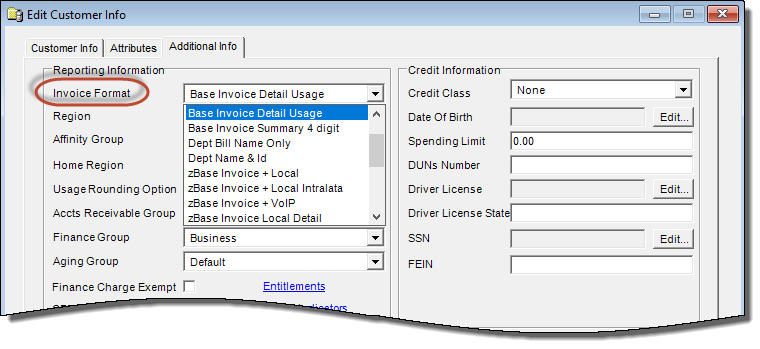
For customers that require this presentation, the appropriate Invoice Format (that has these reports enabled) must be selected on the Add/Edit Customer form.
Customer Care:

IDI Desktop Client: