
This solution helps users comply with ASC 606 revenue recognition standards. ASC 606 was developed jointly by the Financial Accounting Standard’s Board (FASB) and International Accounting Standards Board (IASB). It provides a framework for businesses that enter into contracts with customers to transfer goods or services to recognize revenue more consistently.
This solution enables users to perform the sale of a service that involves items and conditions that make it applicable to the FASB ASC 606; specifically, a retail sale involving the activation of a monthly-billed service that includes retail-discounted equipment for acceptance of a contract. For example, a customer receives a $500 discount on a new handset by agreeing to the terms and conditions of a 2-year Contract. When these sales and FASB ASC 606-supporting conditions are met, the solution will capture and calculate the amount of the Contract Asset which will be used by Billing and General Ledger posting of the newly sold service.
The solution provides:
- The ability to mark contracts and retail discount reasons as FASB ASC 606 Eligible.
- Calculation and storage of a Contract Asset Value used by the billing system to accurately apply in the IDI General Ledger.
- A new Contract Sales Audit report
- Active Contract Asset Value by Account
- Forfeited Contract Revenue
Configuring FASB ASC 606 Eligibility
Contracts and Retail Discount Reason must be marked as eligible for use in FASB ASC 606 Eligible sales scenarios to support downstream billing and general ledger functionality.
Contract Configuration in the Product Catalog
A new setting on the New/Edit Contract form in IDI Desktop Client Product Catalog lets you mark the contract as FASB ASC 606 Eligible. Once enabled, the setting applies to all instances sold going forward. The setting is disabled by default.

Additionally, a General Ledger tab has been added to this form. This tab displays the General Ledger Subcategories and corresponding General Ledger Account Codes to be used on General Ledger entries for contract asset amounts. Override capability is provided. Note: The new General Ledger information is only applicable for FASB ASC 606 Eligible contracts and does not impact existing Contract Penalties.
Retail Discount Reason Configuration in POS back Office Setup
A new setting on the Add/Edit Retail Discount Reason dialog lets you mark the discount reason as Is FASB ASC 606 Eligible. Once enabled, the setting applies to all instances going forward. The setting is disabled by default.
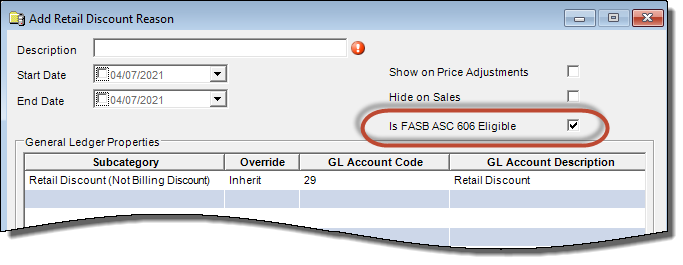
Is FASB ASC 606 Eligible status for existing reasons is indicated in the Retail Discounts form in POS Back Office.

Reports
The reports (and original Contract Asset Sales Audit report) are available in the Report Explorer > Finance > Accounts Receivable folder.

CONTRACT ASSET SALES AUDIT REPORT
This report audits sales activity of any new postpaid service that involves the Contract Asset and other items and conditions that make it applicable to FASB ASC 606. This new report is located in the Report Explorer > Finance > Accounts Receivable folder.


Location, Finalized From Date and Finalized To Date are required. Account Number and Include Returns are optional.
The following columns are included in the results of this report:
- POS Location
- Finalized Date
- (POS) Receipt Number
- Account Number
- Customer Name
- Service Number
- SKU (of the Equipment/Retail Product sold)
- Description (of the Equipment/Retail Product sold)
- Equipment ID (of the Equipment/Retail Product sold)
- Unit Price (of the Equipment/Retail Product sold)
- Promotional Discount Amount (applied to the Equipment/Retail Product sold)
- Promotional Discount Reason
- On-the-Fly Discount Amount (applied to the Equipment/Retail Product sold)
- On-the-Fly Discount Reason
- Net Sales Price
- Sales Tax
Active Contract Asset Value by Account
The Active Contract Asset Value by Account report lets you review the current value of the Contract Assets that are applicable to the FASB ASC 606 standard. The report calculates and presents the current Contract Asset Value per Account/Service as of the moment the report is run. Contracts that are no longer active are not included.
This report will return data for all accounts unless a specific account number is specified.
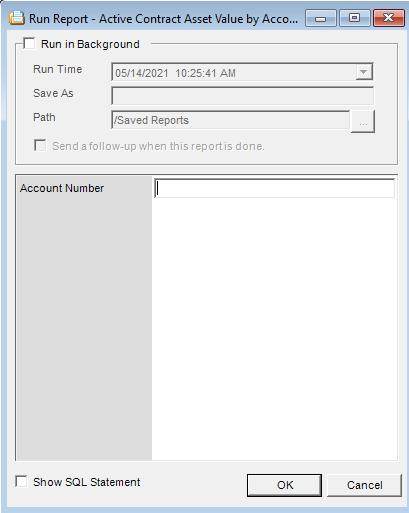
The following columns are included in the results of this report:
- Account Number: Customer Account Number
- Customer Name: Customer name
- Service Number: Service number that the Contract is associated to.
- SKU: FASB ASC 606 Contract SKU.
- Start Date: Contract start date.
- End Date: Contract end date.
- Asset Value: Contract asset value calculated at the time of sale.
- Calculated Monthly Allocation: Contract asset value divided by the number of months in the contract.
- Number of Remaining Invoices: Number of months remaining in the contract that have not yet been invoiced.
- Remaining Contract Asset Balance: Sum of the remaining monthly allocations that have not yet been invoiced.
Forfeited Contract Revenue
The Forfeited Contract Revenue report provides the identification of each early-disconnected FASB ASC 606 contract and the resulting amount of forfeited unearned revenue, if applicable.
From and To dates must be specified when running this report.
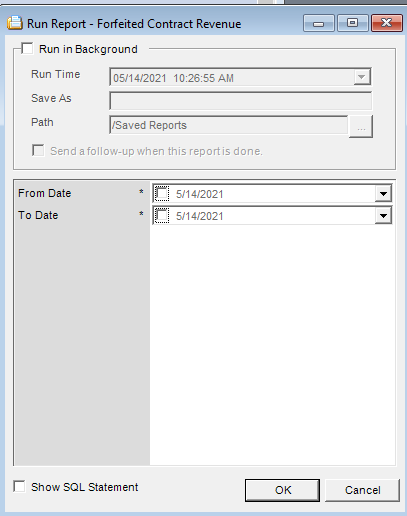
The following columns are included in the results of this report:
- Account Number: Customer Account Number
- Service Number: Service number that the billed contract was disconnected from.
- Contract SKU: FASB ASC 606 Contract SKU.
- Contract Name: Configured description of the contract.
- Disconnect Date: Date the contract was disconnected.
- First Billed Date: Invoice date when the contract was first billed.
- Last Billed Date: Invoice date when the contract was last billed.
- Contract Billed Count: Count of times billed prior to being disconnected.
- Amortized Amount: Total amount amortized of the contract (sum of monthly GL entries while active).
- Months Forfeited: Number of months forfeited because of early disconnect.
- Amount Forfeited: Monthly contract asset value times the number of months forfeited.
- Reason: Disconnect reason provided on the disconnect order.
Processing FASB ASC Eligible Sales
Several areas in the IDI solution have been updated to process FASB ASC-eligible sales. This involves the sale of a new monthly-billed service where:
- A Plan has been assigned to the new service. This is the catalog item designated with Exclusive Group = Plan. This plan, when billed, applies its configured Monthly Recurring Charge (MRC) to the subscriber’s invoice.
- A contract (catalog item) that has been configured to be FASB ASC 606 eligible.
- A retail discount has been applied by either a retail promotion or on-the-fly to the new service’s equipment (retail product) with a retail discount reason that has been configured to be Is FASB ASC 606 Eligible.
When all of these conditions have been met, the system processes the sale as described in the following sections:
- Calculating Contract Asset Value
- Billing the Contract
- General Ledger entries
Calculating Contract Asset value
The solution performs the following calculations to determine the value of the Contract Asset:
Contract Asset Value = (C*D*M / (C*M + S); where:
-
- M = Monthly Recurring Charge of the plan Note: With CostGuard version 23.4 and later, if no plan is added/updated in the order, the calculation will use the existing plan on the service.
- S = Total Standalone Price of Qualifying Retail Items
- D = Total of Qualifying Discounts
- C = Contract Duration
This calculated value is rounded using the following formulas:
- Value / C where the quotient is rounded to the hundredths place (per currency).
- Then the Rounded Quotient * C = rounded Contract Asset Value
The rounded Contract Asset Value provides an amount that can be allocated by Billing without requiring additional rounding. Use the Contract Asset Sales Audit report to review and assess those sales and the details that contribute to the calculation of the Contract Asset Value.
For example, consider an FASB ASC-eligible sale where:
- The Standalone (unit) price for the ‘IDIphone X’ is $849.99
- By agreeing to a 2-year agreement (contract), the Customer only needs to pay $249.99 for the ‘IDIphone X’ (i.e. a Retail Discount of $600 was applied)
- The customer agrees to a Monthly Plan that will be $40/month. Note: The customer would pay $40 in access charges per month as a standalone price.
- The Cost of the ‘IDIphone X’ for the seller is 800.00
In this case, the calculation for the Contract Asset Value uses transaction and standalone prices of the items involved to calculate Percentage and Total Pending Revenue, as shown here:
| Item Involved | Transaction Price | Standalone Price | Percentage | Total Pending Revenue |
| IDIphone X | $249.99 | $849.99 | 46.96% | $568.22 |
| Monthly Plan | $960.00 | $960.00 | 53.04% | $641.77 |
| Total | $1209.99 | $1809.99 | 100.00% | $1209.99 |
Where, the Items involved are the IDIphone X and the Monthly Plan (where $40/month x 24 months = $960.00). Note: Additional Retail Products could be considered as an involved item(s) if conditions apply.
The Percentage is calculated based on the ratio of the Item’s Standalone Price to the Total Standalone price:
- 849.99/1809.99 = 46.96%
- 960.00/1809.99 = 53.04%
The Total Pending Revenue (per item involved) is the result of the Percentage and the Total Transaction Price:
- 46.96% x $1209.99 = $568.22
- 53.04% x $1209.99 = $641.77
The resulting value of the Contract Asset is Total Pending Revenue less the Transaction Price (of the IDIphone X only): $568.22 – $249.99 = $318.23
The calculated contract asset value is then divided by the contract duration and the quotient is rounded (per currency rounding rules): $318.23 / 24 months = 13.25958333 -> $13.26
The final (rounded) Contract Asset Value is then calculated by multiplying the rounded monthly amount to the contract’s duration:
Rounded Contract Asset Value = $13.26 x 24 months = $318.24
Billing the Contract
Billing is considered a met performance obligation of the Contract. When a new service with a contract (associated to a calculated Contract Asset Value) is billed for the first time, the solution calculates the monthly amortized amount using the formula:
Monthly Amortized Amount = Contract Asset Value / Contract Duration (number of months).
Continuing the above example, this results in: $318.24 / 24 months = $13.26
Billing then creates an entry for each month of the contract’s duration. Each entry is associated to the monthly amortized amount. Going forward, each time billing occurs for the contract (including the first time billed), an entry is marked with the bill period and invoice number. The Active Contract Asset Value by Account report can be used to audit the current value of the Contract Assets by Account and Service.
In the case of an early disconnect of the contract, Billing will set the IsEarlyDisconnect flag on the contract’s remaining entries and identifies them with the invoice number and bill period that the disconnect was processed. The Forfeited Contract Revenue report can be used to assess the disconnected contracts and details that contribute to the calculation of the forfeited contract revenue amount.
General Ledger Journal Entries
Performing the General Ledger (GL) posting for New Charges after the billing process creates the journal entries that represent recognized revenue or other Contract Asset related activity. These journal entries use the new GL configuration that was added to the definition of a contract (Product Catalog) where it supports the assignment of the desired GL Accounts to each supported GL Subcategory.
Continuing the above example, after the $40/month Plan is initially billed and the GL posting is completed, the following GL journal entries are created:
GL Account Description Debit Credit
Contract Asset 318.24
Unearned and Billed Revenue 318.24
And with each billing (including the first), the amortization of the Contract Asset creates a journal entry of:
GL Account Description Debit Credit
Earned and Billed Revenue 13.26
Contract Asset 13.26
And if the Service/Contract disconnects early, then with the next billing, the recognition that the remaining unearned revenue will not be earned creates a journal entry of (using amounts that reflect an early disconnect occurring with 5 months/bill runs remaining: 5 * 13.26 = 66.30):
GL Account Description Debit Credit
Returns 66.30
Contract Asset 66.30
