
The way to successfully manage your customer interactions is to have the capability to do this built into the same solution that you use to manage the rest of their lifecycle. IDI’s Communications platform gives service providers the ability to:
- See the full picture of your accounts by using the same system to manage both your customer data and your customer communications.
- Take control of your customer interactions. Gain insight into why customers are contacting you and what type of service they are receiving back.
- Accelerate your processes. Features such as conversation threading, auto-replies, message templates and response tracking provide a centralized, organized approach that reduces the time needed to send or find a message.
- Ensure quality and consistency by pre-defining the messages and processes that your employees use.
2-Way Email Conversations
Send and Receive Emails in the IDI Platform
Users can send and review Emails directly from the item that they are working on in the IDI platform which makes finding a pertinent conversation very easy. In addition, Users no longer have to copy and paste emails or search for them in a separate system which saves time and effort when servicing customers or working tasks. Items that support this functionality have an email icon displayed on the page letting the user know it is Communications enabled.

IDI web modules that support 2-way email communications are:
- Customer Care
- Tickets
- Workflow
Email Conversations
Replies to an email are received back into the IDI platform and threaded into the existing conversation. Users reviewing the communications for an item are able to quickly understand the history of what has been discussed and what the current status is.

Pre-defined Message Templates
Administrators can pre-define message templates to be used when sending an email from the IDI platform. Templates reduce the time needed to send a message, ensure completeness and also increase customer satisfaction received by providing a consistent experience.
Templates include the ability to use Smart Data replacement in order to automatically pull-in information from the IDI object that is the subject of the communication.

Unsolicited Email Management
Manage Unsolicited Feedback
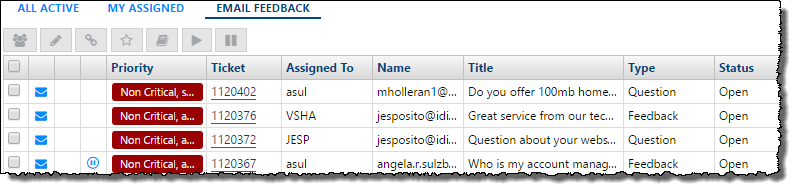
Improve your customer satisfaction by responding quickly and consistently to feedback when you manage customer-initiated communications in the IDI platform. An email received by your organization with questions, concerns, feedback, praise, or requests will result in a Ticket being created which has the email automatically attached.
Why use IDI Tickets to manage your customer emails?
Ensure every email receives a response
Dashboards and work queues provide an immediate view of which customers have not yet received a reply. Ensure that no customer inadvertently feels like their concerns are being ignored.
Improve service quality by measuring it
See how long emails sit before they are reviewed and how long it takes for your organization to respond. Centralized access to conversations allows your organization to review customer feedback and your responses without needing shared email account logons or setup.
Accelerate your responses
Workflows and Message Templates provide a centralized, organized approach that reduces the time needed to send a response and help ensure the right response is sent every time.
Automatically tie feedback to Customer Accounts
Feedback coming from existing customer contacts is automatically tied to that account. See the history of their feedback and concerns when looking at their account record.
Know your customers
Ticket’s classifications and resolution codes allow you to categorize the feedback you are receiving from customers in order to identify and prioritize improvements in your organization
Network Monitoring Integration
Open and Resolve Tickets based on Network Monitoring alerts
Save time and resources by eliminating the need to swivel-chair or to develop your own integration to get monitoring alerts from your NMS opened as Tickets in the IDI platform.
NMS ‘component down’ alerts received by the IDI platform will open a Ticket and automatically attach it to the proper item in the Equipment Inventory module. If the equipment is assigned to services on customer accounts, you have the option of creating individual child tickets for those customers as well. This allows your customer service teams to be proactive and notify customers of interruptions or alternatively to have information readily available if a customer calls to report the same issue.
Subsequent ‘component up’ alerts can be used to resolve previously opened Tickets and instantly cascade through your organization that services have been restored.
Setup of this functionality requires only enabling the option in Tickets, providing default values for properties and then adding the proper alert emails in your NMS.

Works with any email platform
Simplified Setup
Communications can be enable for your organization without the need to setup forwarding rules, create mailbox logons, install client software or deploy a specific email vendor integration.
How it works
- Choose an internet domain that you wish to use with IDI Communications. This can be a subdomain of your existing domain such as support.serviceprovider.com. Utilizing a subdomain ensures that only the email relevant to the IDI platform is sent to IDI.
- IDI provides you with the details for the DNS entries that need to be configured for this domain. This allows incoming emails to be routed to the IDI platform as well as for anti-SPAM systems to see IDI as a legitimate sender for the domain.
- Configure the IDI platform with the mailbox addresses in these domains that you wish to use to send and receive mail (e.g. customerservice@support.serviceprovider.com).
